
Lessons learnt from a decade in the industry, practical guides for StartUps, and case studies.
Cyber attacks killing startups before it’s even had a chance to take off from the runway and find its product market fit.
There’s enterprises and global companies like Jaguar Land Rover that’s been brought to its knees, bleeding millions a day, to survive and come back from an attack that started off with a simple password reset request.
On the other hand, we have a horde of internet pundits and vCISOs and ‘security experts’ who feed on these attacks. They fuel the fire by blaming the security functions, the vendors, and the tools, touting that their tool/services/certifications are the solution to your security woes.
If only one could buy themselves that peace of mind, eh?
Any sane founder would want to know that they’re protected against the big bad cyber uglies out there in the dark side of the web. We know that reputation matters, and compromised sensitive information has the power to bury your baby bird of a start up before it’s had a chance to take off. After all, who’d want to sign up to an app/service/tool where their data couldn’t be trusted?
2025 provided ample fodder by way of cyber attacks and incidents like never before. From retail chains in Easter, to car manufacturers, and even Google (supply chain), this was the year that kept on giving in terms of scary stories to fuel the marketing for the cyber vendors around the world.
In an industry worth $212 billion today, with 14% CAGR, it pays to keep everyone in fear of an attack.
Fear that it’s the Cybersecurity/ IT director’s position at risk when something DOES go wrong (trust me, things go wrong all the time).
The budget owner now has money to spend on their ‘must have’ tool that will do a combination of acronyms that sound more made up than those that come after the title of the said director. EDR/XDR/SIEM/SOAR/CSPM against CISSP,CRISC,CISM,CSSP. Acronym speaking to acronym, the more you have, the better it is right?
As a startup it’s also inevitable you’re working against nonexistent budgets that counts for ‘must have’s only, and I’ve assumed that hardly any of the services you buy would be on a typical ‘enterprise’ plan or equivalent.
While enterprise plans give customers the added security and data privacy features (another rant for another time), I’ve written below on the basis that works for anyone.
What actually gets breached at your organisation isn’t going to be the sophisticated APT by a nation-state gang who’s there to get your IP and or data, it’s more likely that you’ve set things up in a way that makes it easy for your systems to be breached.
Here’s what actually gets breached:
These can lead to a range of attacks (let’s forget who does this for a second), ranging from phishing to ransomware (following the cyber kill chain) and blackmail or public disclosures causing your reputation to tank, and have regulators knocking at your door.
More often than not, we think security can be thought through when there’s more resources, or more money. When the PMF is achieved, and you have an MVP. But by pushing security to a later stage, you’re doubling your costs to implement basic best practices.
When it comes down to it, the age old advice of protecting the Confidentiality, Integrity, and Availability still holds true, like a pyramid balancing the tools and attacks stacking up like a house of cards.
That being said, there are a few fundamentals that, when done right, give you a solid foundation that can stand true, even when you’re on your 5th DevOps hire, or going for SOC2 Type II for that first enterprise client.
These controls gives you enough to not get wrecked, attract larger clients in B2B, and pass basic due diligence.
Don’t let your security controls be part of the ‘legacy’ code you end up griping about down the line!
This is non-negotiable.
It’s no joke when even in 2025 where the average person, who uses over 40 different applications, is expected to create, and remember long and strong passwords for every one of them.
Human behaviour is in sticking with the memorable, or familiar. This often leads to the reuse of memorable passwords that follow them through their life, through jobs.
Do us all a favour and look at a decent password manager that your staff can use to create, store, and share credentials in this day and age. I recommend tools like ‘Dashlane’ and ‘1Password’, where you can get the added benefits of dark web monitoring in case your credentials (even for personal emails) are breached and shared in the dark web.
Stolen credentials are so prominent (right up there with phishing) in terms of initial attack vectors purely because we’re creatures of habit and reuse the same passwords our brain memorised rather than brand new ones.
Some of these password managers give free family pass, meaning your staff can also keep their family protected using the same controls, giving you personal and professional credentials protections. Let’s be honest and think about how many passwords we re-use across jobs, across personal and professional systems, etc. Even just one is one too many when it comes to compromise.
Pair this with Multi-Factor Authentication, Single Sign-On (using your native Google/Microsoft), and Just-in-time- credentials for cloud to have the basics in place.
As with passwords, the other very obvious thing that gets overlooked is exposed or hardcoded secrets in the code.
Please don’t use your own credentials, instead rely on service accounts and credentials as variables stored securely.
Using a Secrets Manager like AWS/GCP/HashiCorp Vault makes it easier to build in the confidence around secrets management in code from day 1. You also have a lot less headache in terms of using AI for coding purposes.
#  DON'T DO THIS
AWS_SECRET_KEY=”xyz123” npm start

# WHAT TO DO INSTEAD
aws secretsmanager get-secret-value --secret-id prod/api-key
# or use OIDC federation (no long-lived creds at all)
```

**Implementation priorities:**
1. **Remove ALL secrets from code/configs** (use GitHub secret scanning alerts)
2. **Secrets manager for everything** (AWS Secrets Manager, GCP Secret Manager, Vault)
3. **Workload identity over API keys** where possible (IRSA, Workload Identity Federation)
4. **Rotation:** Database passwords every 90 days, API keys on employee departure, emergency rotation playbook


#### 3. **Access Control (Prevent Insider Threats)**

**The model that works:**
```
Default: No access
Request: Time-limited, justified, logged
Review: Quarterly access audits (who has what)
Revoke: Immediate on departure, automatic expiry

- Use managed services with IAM roles (RDS, Cloud SQL)
- Never create an IAM user with long-lived access keys again
- Everything authenticates via OIDC or temporary credentials
You should aim to implement least privilege based access everywhere possible.
No, not everyone needs admin access to all the tools- only some do. If you’re setting up a tool, look for price, ability to do SSO with Google/Microsoft (depending on your tech stack), and implement MFA wherever possible. On your product related tech, make as much of the access provisioning part of code as possible. This looks like access provisioning done through code, which automatically has a PR approval baked in, which also logs access approvals + provisioning. This, along with break glass access procedures, make life much safer. You’re not preventing people from accessing the tools they need- you’re just ring-fencing the levels of access to the minimum needed for the business activities. When in troubleshooting, these processes help you be transparent about the activities, and consciously encourage your engineers to request and revoke access in an automated way.
Say your devsecops person, who typically holds all the sensitive access and literal keys to the kingdom, uses their privileged access on a daily basis, and maybe even uses the root login for regular activities. You have every reason to worry that a single mistake from them is going to cost you in potentially your AWS account (and everything in it) being deleted or disclosed publicly.
Now think about the same person, who uses a less privileged account for their regular activities, root keys are used never, and escalates their privileges as needed to push deployments, or update the terraform code. If they find their credentials compromised, the following are true:
1. <less likely that this was a root account, and so you don’t have to worry about losing your AWS account and contents
2. <less likely that this was a privileged account, since these are done in a systematic way for specific actions
3. There was MFA, Password manager, and one time codes/ passkeys/ secrets stored outside the code base and specific to different systems, therefore the scope of damage an outsider can cause with credentials leak is much lower.
You’ll thank me when you get to your ISO 27001/ SOC2 Type II audits/ client due diligence, I guarantee it.
Having a log of all the tech you use, the use cases, and people who need access to it helps you build an organic RBAC/Vendor log/RoPA which you can come back to, to review and maintain.
This not only helps you manage who has access to what, but helps build the foundations for your legal documentations like RoPA (Records of Processing Activities) as required by GDPR, and Vendor Log or Role Based Access Control log- both of which are requirements when seeking ISO 27001 or SOC2 Type II assurance.
Encrypt your data in transit with TLS 1.2 or 1.3 (I recommend 1.3). Ensure HTTPS is everywhere in terms of your connections, by default. This is the bare minimum expected by customers, investors, and auditors in terms of security of data in transit.
Set up a VPN that your employees can use on the go, that actually works with good latency, and that connects automatically on startup to make this a standard for work (and not a chore). This encrypts your internet traffic through a virtual tunnel, and also enables you to work from anywhere, in true spirit of global remote work culture.
All data at rest should be encrypted.
With AES 256-bit encryption or higher standard (aka military grade encryption as the cybersecurity founderbros like to call it).
# Everything in version control
# Use modules for repeatable security patterns
module “secure_s3_bucket” {
  source = “./modules/secure-storage”

  versioning       = true
  encryption       = “AES256”
  block_public     = true
  access_logging   = true
  lifecycle_policy = true
}

# Policy as Code
resource “aws_iam_policy” “deny_public_buckets” {
  # Prevent developers from making dumb mistakes
}
Easier said that done right?
We can go into a whole post solely focusing on this topic, but for the purpose of this list, you need to understand that encryption by default may be slightly costlier, but pays in dividends if there is a breach or an cyber attack.
Typically you’ll have an infrastructure on cloud with VPCs and gateways to talk between etc. All good stuff, but make sure your connections are encrypted.
VPCs need to be encrypted at rest, and have adequate controls set up (route table, authenticated connections, trust zones + deny all unless specified by default).
You should add Transparent Data Encryption (TDE) for your databases, and enable Full Disk Encryption (FDE) which operates at the OS/Hardware level to layer in the security controls like a biriyani (or, swiss cheese, if you prefer this analogy).
You should also enable Server Side Encryption (SSE)- although this is enabled by default by most cloud services providers these days.
If you have co-mingled data for several customers within your database, you can also use encryption of data (using AWS KMS for instance) to automatically assign and use individual organisational encryption keys to segregate your customer data from others, and show adequate confidentiality and integrity of data based on your implementation of this. You can also ensure the access to the KMS secret key is only through the application for users who belong to that customer organisation.
Do be aware you need to consider costs for doing this, and also think about how key rotation will work- if it ain’t automated, it won’t get done. Long lasting secret keys are a gateway to enable your disgruntled ex-co-founder to go and download your codebase, or data. It’s that nudge that makes it just easy enough, and justifiable enough for even a normal person (under certain circumstances) to do something they shouldn’t.
The age old saying about Prevention is better than cure (when referring to sickness) rings true here as well - it’s easier to build in the automated key rotation, and offboarding, to not leave a door open.
Often security professionals skip over this bit, mostly because it’s not too much of an issue unless you work in a regulated industry like Fintech, or Medtech, where the integrity of the data can have a major impact to the data subject, or the customer.
Assess your risks- what happens if the information on your system is tampered with? Map out the costs in a potential legal suit, or if it results in the loss of your biggest customer.
This should give you an indication as to how important it should be to your overall product/ company.
Protecting integrity of data and operations is largely down to a few controls. This is because at the heart of it, integrity of data (or file, code, or action) is about making sure that the action was completed by the person and not tampered with between them clicking a button, and what is received by the servers on the backend.
Authenticating and validating requests with a ‘trust, but verify’ approach works exceedingly well in most areas here.
Where would you apply this?
Establish a software engineering process that technically enforces the ‘trust but verify’ concept. This can look like, AWS pulling code from the codebase (and rejecting all Pushes) within an established CI/CD pipeline. This can also look like signed commits, code approval processes as part of Pull Requests (PR), or forced scans from Dependabot (or equivalent), or CVE scans to approve and validate risks of merging insecure packages or code into the repository.
If you’re not able to verify and see who authorised code changes, it becomes almost impossible to detect when someone maliciously does this.
Imagine if you wake up one day to see your app disappeared, or look completely different (and defaced)? Even if an attacker doesn’t get access to your database, they can do a lot of reputational damage by pushing code to production by bypassing your controls. For example, if there’s a single service account that’s got the administrative access to push code to production and the account doesn’t need to:
In this scenario, even if you were using the right tools (ie secrets manager, password manager, service accounts), weaknesses in your process for verifying and validating high risk actions (like pushing code to production) is at risk of misuse- ultimately leaving your reputation damaged.
An average startup can have 1,000+ dependencies (my last client had 7,000+) and it can be more than a full time job to keep on top of things, if you think traditionally. The main driver for dependency/package upgrades are functionalities. That being said, internally, someone should own looking at them, deciding if the vulnerabilities relating to the packages affect core functionalities, and upgrade on a regular basis.
// package.json
{
  “scripts”: {
    “preinstall”: “npm audit --audit-level=high”,
    “postinstall”: “npx lockfile-lint --type npm”
  }
}
Don’t just approve dependabot PRs without review, this will break things. It’s much better to consciously put the non-critical issues to upgrade on a bi-weekly or monthly basis.
The industry is bloated with security tools touting all sorts of security jargon, but a good ASPM/CSPM will do several things:
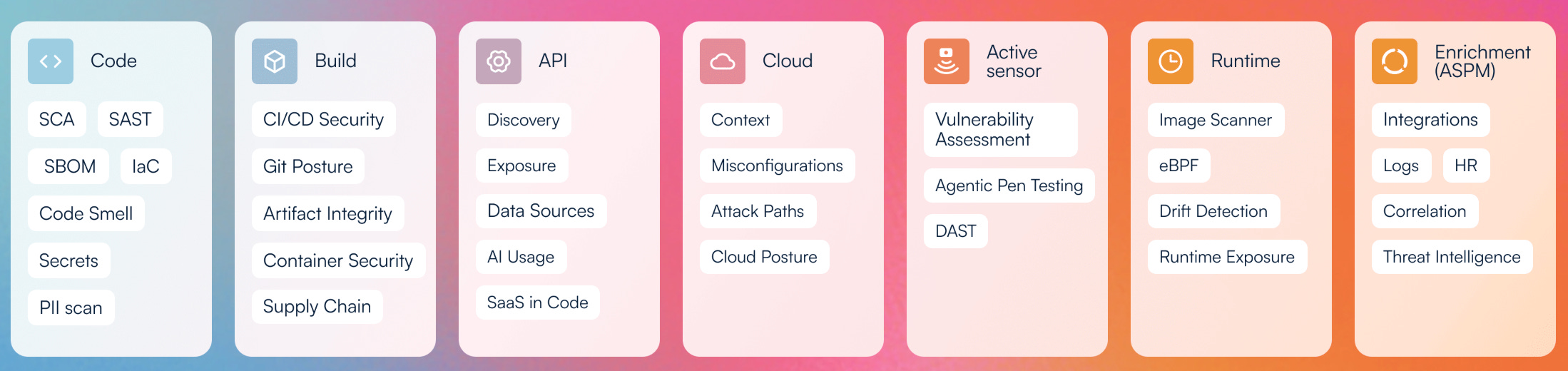
Good application security program doesn’t fix all the highs, or have 0 vulnerabilities. What you need to focus on is how you can determine whether a CVE linked to your code base that ranks as an 8 (high/critical) is actually affecting your organisation as a critical issue. Ask yourself (or your engineers, or even AI) the following questions with any given vulnerability:
If the answer to the first 2 is yes, you should definitely fix this as soon as you can. There’s been several vulnerabilities that were exploited and spawned a bunch of other attacks (anyone remember MoveIT vulnerability?)
As for the others, these help you prioritise and schedule it so that you’re still getting to it, but adding it to the future sprints to upgrade the dependency. As a lot of product functionalities may be affected, it’s important that this is done and planned together with the product and engineering functions. Proper testing before pushing the dependency upgrade helps make this an easier process.
I believe a proper threat assessment of your organisation and product landscape can do a lot more for awareness and incident preparation than your annual security awareness training programme or an audit in your first year as a startup. Costs less too.
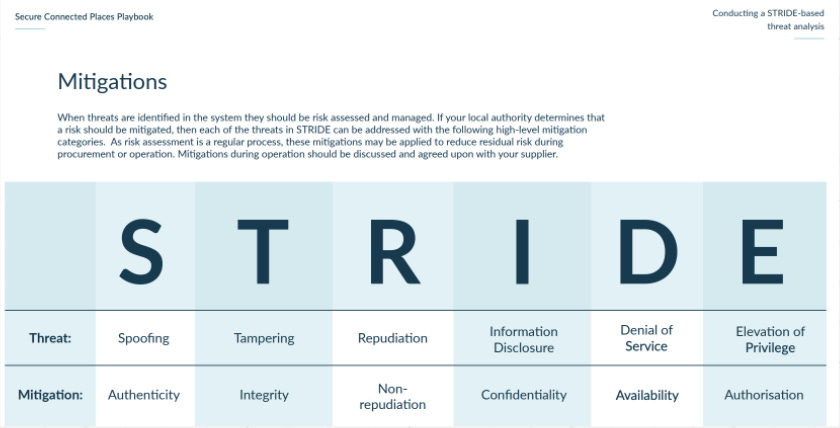
I recommend starting with a simple framework like STRIDE to get you going in terms of documenting and articulating the ways in which an attacker could spoof, tamper with, or get in and cause damage (like denial of service, elevation of privilege, and repudiation or integrity attacks) across your product.
It doesn’t matter what it looks like (I prefer my threat assessments as braindumps on Miro) but you should consider your product/platform as a whole, and decide if some elements need to be split into their own thing. Major functionalities (ie web application, mobile application, phone in services, support portal) should be considered individually as you might have different controls for each of them. While there’s 2FA and SSO for your web app, do you have the same/similar authentication into your mobile app? Is it using biometrics for signing in? Or does it text you a code?
For me, audit logs are a bit like the stone angels in Doctor Who (for anyone who hasn’t heard of it, it’s one of the best). When you’re looking, it seems to show the same info x logged in, y looked at this record. But it’s when you’re not looking that things always happen.
I should also note that in this day and age, unless you’re a large org with a dedicated SOC team, or are a security vendor, no one really has the time or the desire to look at audit logs all day. Can you imagine anything duller?
But at the same time, if you’re not logging at all, there’s absolutely no way of knowing or finding out if you’ve had a compromise or a lurker exfiltrating your data.
You need to maximise resources in whatever way you can whilst doing what’s right in terms of looking out for the commercial interests (let’s face it, non-existent audit logging will have your customers switching to your competitors faster than you can say audit logs), here’s my must haves here.
Here’s what you should be logging, for your database, and application:
Create, Read, Update, and Delete actions for the platform/system should be captured, alongside logins, export, and other privileged actions such as access to your PII (or sensitve information) or disabling security controls like MFA. You should do this across the board for tools touching your customer data to ensure you’re able to investigate issues in future.
For AI based products you should also include detection and alerting for common attack vectors for LLMs like:
# Alert on these patterns

suspicious_patterns = {

    ‘prompt_injection’: r’(ignore previous|disregard|new instructions)’,

    ‘jailbreak_attempts’: detect_jailbreak_patterns(),

    ‘data_exfiltration’: lambda: requests > 1000 and unique_ips < 10,

    ‘model_probing’: lambda: sequential_queries_testing_boundaries(),

    ‘cost_attack’: lambda: avg_tokens > 5000 and completion_rate < 0.1

}
One thing most people forget to include is also alerts for when things go down. Lack of response from a system is, in itself, an issue you should be alerted on.
Another area to monitor are signals of things starting to go wrong. It’s all well and good to know when things go down, but there are often signals of issues, broken down into the following as a starting point:
Critical alerts (wake someone up):
  - Error rate >5% for 5 minutes
  - API latency p99 >5 seconds
  - Database connections >90% of pool
  - Disk usage >85%
  - SSL certificate expires in 7 days
  - Payment processing down

Important alerts (Slack during business hours):
  - Error rate >1% for 30 minutes
  - API latency p95 >2 seconds
  - Unusual traffic patterns
  - Third-party API slow/failing

Info alerts (dashboard only):
  - Deployments
  - Scaling events
  - Resource utilisation trends
Tools like DataDog, Sentry, Segment etc. can provide detailed application, error, and usage related logs, although you should vet your vendors and configure them properly to avoid accidental exposure of PII in logs.
Retention of logs can rack up in costs if not careful. Best practice deems you should consider the following:
Archive logs to cold storage for compliance and review in the event of an incident, so that you can manage your costs effectively.
This brings us to the last pillar of the CIA triad. Last, but not least- as availability of a product that customers are paying for is a fundamental requirement for sales.
Larger, or more experienced buyers may require your company to include statements of security, and/or availability requirements as part of your service agreements.
So how do you maintain, and calculate your availability?
AWS is famous for its 99.999% uptime guarantee. This actually calculates to only having 5 minutes of downtime per year. This is also why many companies go with AWS as their cloud service provider, as they’ve backed up their SLA commitment with a promise to pay service credits if the uptime goes down below 90%. You’re able to use AWS Health Dashboard to understand the health for services used by your organisation.

It’s expected that a product that isn’t intended for daily use, or have time critical impact in real world, should provide atleast 98% uptime as part of their service level agreements (SLA).
Does that mean you have to sit their calculating uptime after every incident? Yes and no.
Yes, in that you need to be aware of the impact of a future incident can have and how much time you’ve got before you trigger customer/financial costs from an outage for your next incident.
No, because it doesn’t have to be manual. There are plenty of tools like Uptime Robot or BetterStack that pings your integrated apps every X minutes to log uptime + availability for your products. This helps users check whether a site is actually down or if it’s their machine when there’s an issue. They’re also able to subscribe for alerts for outages, and you can also create a custom url and embed it into your site for transparency and ease of use.
Ransomware has been riding the news waves globally over the past few years, each year getting bigger and more sensational. If you think back to just Easter, several of UK’s major retail chains suffered massive cyber attacks costing millions in lost revenue, but also in customer trust and service availability. The shops literally couldn’t process payments for days, leaving customers shopping elsewhere.
The Jaguar Land Rover (JLR) attack started with a social engineering attack against a service provider, gaining access to an internal account, then launching the main attack from there. This is costing them approximately £1.9billion, making this the costliest cyber attack in history.
Scary statistics aside though, the reality is that of all the common causes of outages and product unavailability, ransomware only accounts for about 10%. The most common cause, accounting for almost half of all outage events (including the recent AWS outage which brought down half the internet) are caused by misconfigurations, or human errors in deployments. This is why I want startups to take the integrity of more than just data into account, as described previously.
Control the flow of deployments, code changes, and config changes under a CI/CD that runs checks, and requires a peer review or approval before being merged. This helps minimise the risk of accidental changes, or click ops causing drift from config.
Naturally, you can’t discuss availability without Backups. A good backup strategy and recovery plan is really and truly the sword and shield against ransomware. But doing it wrong can have awful consequences if you do end up being within that 10% statistic and subject to a ransomware attack.
Go for an immediate backup in a separate region/availability zones which can act as a read replica to handle traffic to your platform. But also invest resources to set up a process for longer term backup.
Enable your daily snapshots and Point in Time restore capabilities (these tend to be retained for 35 days) using AWS Backups or equivalent option from your cloud service provider. In addition to this, there should be a cold storage for your backup which has lower costs for storage, higher costs for querying (like S3 Glacier). This will help you move your data (from your database + file storage) version controlled, on a periodic basis (like once a month) to the cold backup.
Your backup should be segregated from your production data store, because if the attacker is able to get access to your privileged account/ credentials and move laterally, the first thing they’ll do is delete backups or encrypt them before encrypting the production (which typically triggers the alarm), and remove themselves from audit logs.
It goes without saying, that the backups should also have similar/higher security controls than production, given how this works, including logging and alerting on suspicious activities. AWS alarms can be used for these alerting.
Last but not least, a brief note on policies. If you know me, I’ve spent majority of my time working on policies, and making them work. Policies can be great when it reflects the state of play in the organisation, and also has monitoring of effectiveness (to identify processes that drift from the intent, much like IaC). Policies (technical or otherwise) articulate what is expected (from employees, systems, service accounts), so that people can do the right thing. A lack of policy on something can lead to employees suing for unfair dismissal after repeated colossal fuckups because you didn’t state that they had to do x y and z.
In terms of security policies, I say use AWS Control Tower to implement a segregated OU based model for your different environments (R&D, Dev, Staging, Demo, Prod) and apply SCPs across the board. These can include policies that enforce encryption at rest, encryption standards, turns off model training for AI usage, and much more. They’re aligned with CIS Controls which have provided a good framework for technical security implementation for DevOps.
In terms of policies in the traditional sense, you need to have only a handful.
While ugly, it will do the job to have an overarching Information Security policy which outlines a brief intent and commitment to information security and continual improvement. It shows credibility to have this endorsed by the CEO.
Separately or inside your one size fits all policy, you should have an Acceptable Use policy to tell your employees not to do stupid stuff on their work machines, including illegal activities like visiting gambling, pornographic sites, or illegally downloading content. They also need to include instructions not to disable the security controls on their machines, or connect to random networks without VPN.
You should absolutely also have a Vendor Management policy, which articulates the minimum requirements for vendor due diligence, approval, and requirements to notify the team so you can maintain your legal requirements for data privacy. You also manage costs better with a well oiled process for procuring vendors.
And here you go, a (non-exhaustive but comprehensive) list of security controls you NEED at startup stage.
Thanks for reading! Originally published on my Substack and iterated on Linkedin and here.
Explore the latest trends, tips, and real-world stories in cybersecurity. Learn how to protect your business with practical, expert advice.

Simple steps to recognize and avoid phishing attempts in your daily workflow. Stay alert and keep your inbox secure.

A step-by-step look at what to do if your business experiences a security incident, with tips for fast, effective action.

Understand the zero trust model and how it can strengthen your organization’s security posture from the inside out.
![[interface] image of software security protocols (for an ai fintech company)](https://cdn.prod.website-files.com/image-generation-assets/28c7bd2b-e0d6-434b-823f-2a9b2c2885a5.avif)
Learn how to identify, prioritize, and patch vulnerabilities before they become a risk to your business.

Discover strategies to foster a culture of trust and communication for parents navigating screens and internet with their kids

Key steps to keep your cloud environments safe, compliant, and resilient against evolving threats.

A practical guide to understanding and meeting today’s cybersecurity regulations for small businesses.

Tips and tools to help your remote team work securely, wherever they are in the world.

Why password management matters and how to implement best practices for your team.

A quick guide to MFA: what it is, why it works, and how to roll it out for your organization.

Learn how to evaluate your business’s unique risks and prioritize your security investments.

An easy-to-follow introduction to encryption and how it protects your sensitive data.

Best practices for keeping your office’s connected devices safe from cyber threats.

How to recognize and prevent manipulation tactics that target your team and data.

Explore reliable backup methods to ensure your business can recover quickly from any incident.

Simple steps to safeguard sensitive client information and build lasting trust.